There are times when we need to find out the actual uptime of our computer. Reasons can be, to know the time you logged into your system or duration you have been working for or anything. Here, I share the two methods of finding the uptime of the system.
The first method is very simple. Follow the steps given below.
1) Right click on the taskbar and select "Task Manager" or "Start Task Manager".

2) In "Windows task Manager" box, select "Performance" tab.
3) The Uptime can be seen in the "System" section.

The second method is bit geeky but not that complex. With the steps given below, you'll be able to do it with in minutes.
1) Open "Run" dialog box by press "Win key + R".
2) Type "cmd" and press enter. This will open the command prompt. (*)

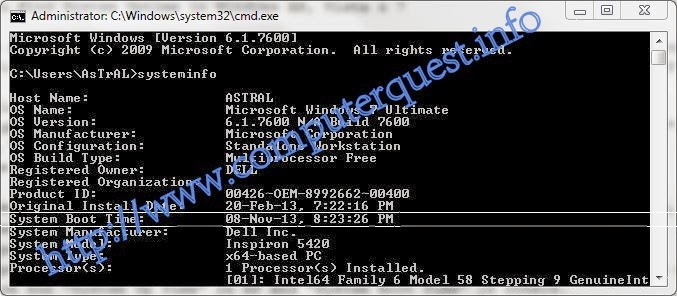
3) Type "systeminfo" and hit enter. You should see the list of results in a few seconds. (*)
4) Look for "System Up Time" in XP and "System Boot Time" in others.
(* Type commands without inverted commas)

The first method is very simple. Follow the steps given below.
1) Right click on the taskbar and select "Task Manager" or "Start Task Manager".
2) In "Windows task Manager" box, select "Performance" tab.
3) The Uptime can be seen in the "System" section.
2) Type "cmd" and press enter. This will open the command prompt. (*)
3) Type "systeminfo" and hit enter. You should see the list of results in a few seconds. (*)
4) Look for "System Up Time" in XP and "System Boot Time" in others.
(* Type commands without inverted commas)